How to Use Wise (Formerly TransferWise)? A Step-by-Step Guide to Sending Money, Receiving Payments, and Applying for a Debit Card



Image Source: unsplash
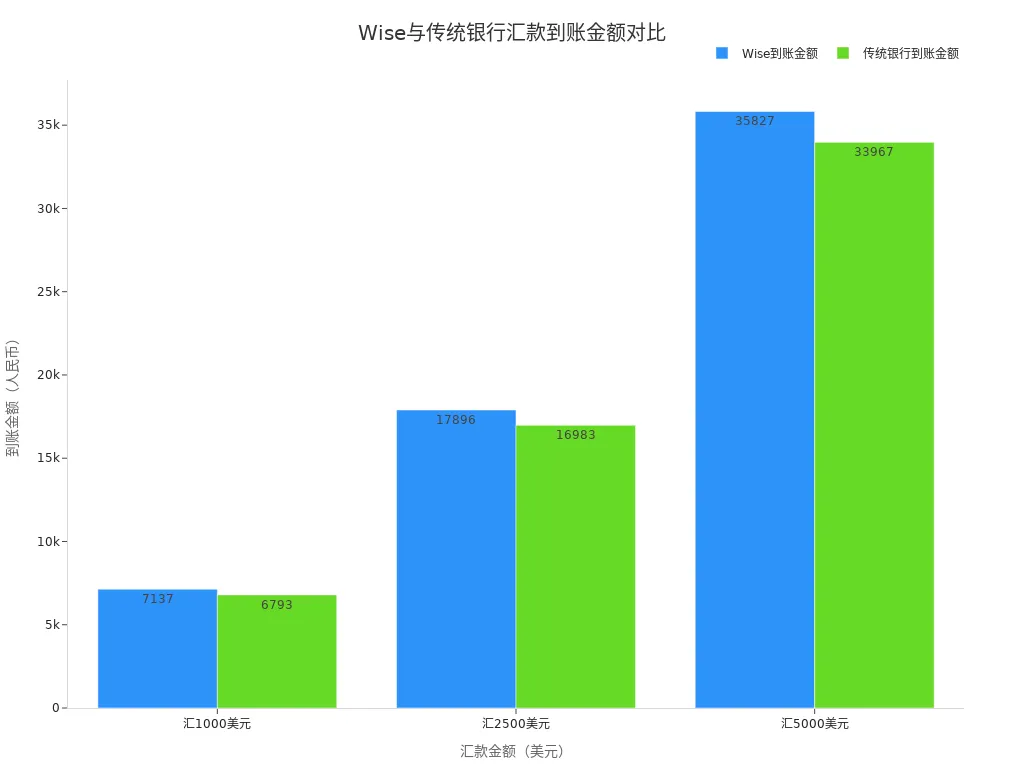
Do you want to send USD to China at a low cost? Wise offers transparent and convenient international transfers, payment receipt, and multi-currency debit card services. Compared to traditional Hong Kong banks, Wise uses real market exchange rates with no hidden fees. Refer to the table below: when transferring 1000 USD, Wise delivers approximately 7137 CNY, while traditional banks deliver about 6793 CNY, with Wise providing roughly 344 CNY more. You can view the bar chart below to intuitively understand how using Wise can help you save costs.
| Item | Wise | Traditional Bank |
|---|---|---|
| Exchange Rate | Real market rate, no markup | Includes markup, hidden fees in exchange rate |
| Transfer Fee | Starting from 0.33%, transparent | Various wire transfer fees, high and opaque |
| Intermediary Bank Fees | None | Possible intermediary bank fees |
| Account Opening & Maintenance Fees | Free | May incur charges |
Key Points
- Wise uses real exchange rates and low fees, making transfer costs significantly lower than traditional banks, saving you substantial fees.
- Registering a Wise account is simple and fast, supporting online account opening for individuals and businesses without visiting a bank branch, with clear material requirements.
- Wise supports multi-currency accounts and various payment methods, with transparent and fast transfers, allowing real-time fund tracking.
- You can easily obtain local bank account details for multiple countries, facilitating payment receipt and multi-currency fund management.
- The Wise debit card is ideal for overseas users, supporting global spending and withdrawals with low fees and no annual fee, enhancing the cross-border payment experience.
How to Use Wise: Registration and Account Opening
Image Source: unsplash
Registration Materials
When registering a Wise account, you need to prepare the necessary materials in advance. How to use Wise? You first need to choose the account type, divided into personal accounts and business accounts.
- Personal account registration mainly requires:
- Valid identification (Chinese ID card, passport, or photo-bearing driver’s license)
- Proof of address (such as bank statements, utility bills, tax documents, or other documents issued by government or financial institutions)
- Business account registration requires:
- Company registration documents (such as annual returns, certificate of incorporation)
- Business-related information (business address, industry, website, or social media accounts)
- Information on directors and major shareholders (full name, date of birth, country of residence)
- Identity verification of the account holder and their position in the company
- If the account holder is not a director or shareholder, a company authorization letter is required
When registering a Wise business account, you also need to prepare a credit card for payment. When registering a U.S. company and opening a Wise business account, you need to provide U.S. company registration documents, EIN confirmation letter, passport and selfie of the business owner, and a U.S. virtual address.
Tip: Wise supports Chinese mainland users registering with an ID card, and the account opening process is entirely online without visiting a branch. It’s recommended to select mainland China as the region during registration to avoid choosing Hong Kong or other regions, which may lead to account closure. Phone numbers with +86 or Google Voice are supported.
Account Opening Process
How to use Wise? You can register directly on the Wise website or app without visiting a Hong Kong bank branch. The account opening process is as follows:
- Visit the Wise website or app and choose to register a new account.
- Fill in personal or business information, including name, address, phone number, etc.
- Upload a photo of your identification document. You can try multiple times until the system recognizes it.
- Select currency accounts. Wise supports opening accounts for over 50 currencies, including USD, GBP, EUR, AUD, SGD, etc. You can obtain corresponding bank account details for each currency, such as SWIFT codes and account numbers, for easy receiving and use.
- For business account registration, provide company details, upload relevant documents, and pay a one-time fee.
- Submit for review. Most users complete identity verification within one day, with the fastest taking a few hours to start using the Wise account.
Note: A business registration number is not mandatory during registration. Sole traders can select the Sole Trader type, with the bank account name being the individual’s name. It’s recommended to use a mainland China address, and proof of address is generally not required, but a bank statement can be provided if needed.
Account Verification
After submitting registration information, Wise will verify the account. The verification process includes:
- Use accurate information during registration to ensure all details are correct.
- Log in to your Wise account and activate the desired currency accounts (e.g., USD).
- Upload photos of your identification document and a selfie, without needing to hold a paper or record a video.
- For business accounts, submit company registration details, industry, address, website or social media accounts, and a list of directors and major shareholders.
- Pay a one-time fee to activate the account.
- Wait for review, typically completed within 2-3 business days. In some cases, additional documents may be required, with a maximum of 10 business days.
- Upon approval, you will receive a confirmation email, and the account can be used normally.
Tip: Personal and business accounts can be managed under the same Wise account, but personal accounts cannot receive business payments. Business accounts support sole traders without business licenses, with funding options primarily via card or Apple Pay.
After completing the above steps, your Wise account can receive payments, send transfers, and apply for a debit card. How to use Wise? Simply follow the process to enjoy global multi-currency account services without complicated procedures.
Transfer Process
Adding a Recipient
When sending money on the Wise platform, you first need to add recipient information. You can choose individual or business recipients. Fill in the recipient’s name, bank account number, and bank details (such as SWIFT code, bank name, etc.). For recipients in countries like the U.S., U.K., or Australia, you can directly input their local account details. Wise supports multi-currency receiving, ideal for transfers to different countries and regions. You can save frequent recipients for quick future transactions.
Tip: When adding a recipient, double-check account details to avoid transfer failures or delays due to errors.
Entering Amount and Reason
When entering the transfer amount, Wise automatically displays the real-time exchange rate and estimated received amount. You can input the USD amount or the amount the recipient wishes to receive in their currency, and the system will convert it automatically. How to use Wise? Simply enter the amount, and the platform clearly shows all fees and the received amount, with transparent fees and no hidden charges.
Wise has maximum transfer limits that vary by payment method and country. Refer to the table below:
| Payment Method/Country | Limit Description |
|---|---|
| Bank Transfer Payment | Up to 1 million USD per transaction, but banks may have their own transfer limits |
| U.S. ACH Bank Debit | 50,000 USD limit per 24 hours, 250,000 USD per 60 days |
| Debit/Credit Card | 2,000 USD limit per 24 hours, 8,000 USD per 7 days |
| Wise Account Balance | 1 million USD per transaction |
| China UnionPay | Up to 18,000 CNY per transaction |
| China Alipay | Up to 50,000 CNY per transaction |
| China WeChat | Up to 30,000 CNY per transaction |
You can see that Wise accounts have no minimum amount requirements, no initial deposit, or minimum balance requirements.
You also need to specify the reason for the transfer. Common reasons include family support, tuition, salaries, service fees, etc. Provide accurate information, as Wise conducts compliance checks based on different countries’ regulations.
Choosing Payment Method
You can choose multiple payment methods to complete the transfer, including bank transfer, credit card, debit card, Wise account balance, etc. Different payment methods have varying processing times and fees.
- Bank Transfer: Suitable for large transfers, with low fees and a maximum of 1 million USD per transaction. Some Hong Kong banks may impose additional transfer limits.
- Credit/Debit Card: Ideal for small, quick transfers, convenient but with daily and weekly limits.
- Wise Balance: If your account has a balance, you can pay directly, with a maximum of 1 million USD per transaction.
Wise calculates all fees and shows the estimated arrival time after you select a payment method. You can choose the most suitable option based on your needs.
Tracking Progress
After completing the transfer, you can track the transfer progress in real-time on the Wise platform. Wise displays each step’s status, including payment received, processing, sent, and received. You can check the fund flow at any time on the app or website, ensuring full transparency.
According to official statistics, 65% of Wise transfers arrive within 20 seconds, with some countries like India supporting arrivals within 90 minutes. By integrating with multiple countries’ banking systems, Wise significantly improves cross-border transfer speeds, offering faster delivery than traditional Hong Kong banks.
Wise’s real-time tracking feature allows you to monitor transfer status at any time, enhancing transparency and security in fund transfers.
Receiving Payments
Obtaining Local Account Details
In your Wise account, you can easily obtain local bank account details for multiple countries. Wise supports local accounts for up to 8 major currencies, including USD, GBP, EUR, AUD, CAD, SGD, etc. Simply activate the balance for the desired currency in your Wise account, and the system will generate local bank account details, including bank name, account number, SWIFT/BIC code, etc. You can use these details to receive transfers from different countries, making multi-currency fund management convenient.
You don’t need to visit a Hong Kong bank branch; all operations can be completed online, saving significant time and effort.
Sharing Payment Details
Wise provides unique payment details for each currency account. You can share these details with individuals or businesses sending you money, such as suppliers, partners, or clients. Common sharing methods include:
- Copy the account details and send them via WeChat, email, or SMS.
- Download a PDF of the account details to provide formal payment information to the payer.
- Generate a payment link directly in the Wise app for quick sharing.
After the payer receives your account details, they can send funds in the same currency via bank transfer. The funds will automatically enter your Wise account balance without additional steps.
Checking Received Payments
After receiving a payment, Wise automatically deposits the funds into the designated currency wallet. You can check the receipt status in real-time on the Wise app or website. The system displays the currency, amount, payer information, and receipt time for each payment. Wise supports receiving and converting over 40 currencies, allowing you to convert foreign currency balances to USD or other currencies as needed.
Wise’s multi-currency wallet feature makes managing cross-border funds easy, enabling efficient payment receipt and fund allocation whether you’re in China or overseas.
Debit Card Application
Image Source: unsplash
Application Steps
You can apply for a Wise debit card directly on the Wise website or app. First, you need to register and complete account verification. Wise determines debit card eligibility based on your region of residence. The table below shows debit card application eligibility by region:
| Region Category | Debit Card Application Eligibility |
|---|---|
| Western Countries | Users in the U.S., U.K., and Canada can apply for a debit card |
| Some Asian Countries | Users in Japan, Singapore, and Malaysia can apply for a debit card |
| Hong Kong | Only international transfer services are available; debit card application is not supported |
| China, Taiwan, South Korea, Indonesia, Thailand | Only transfer and foreign currency account services are available; debit card application is not supported |
You cannot apply for a Wise debit card directly in China. If you live or work in supported regions like the U.S., U.K., or Singapore, you can apply using local address and identity information. A one-time card issuance fee of 9 USD is required, with no annual fee and a transparent fee structure.
Activation and Binding
After receiving the Wise debit card, you need to activate it in the Wise app. Follow the app’s prompts to enter the card details and set a PIN. You can bind the Wise card to mobile payment tools like Apple Pay or Google Pay for convenient daily spending. The Wise card supports cash withdrawals at most ATMs worldwide, with the first two withdrawals up to 100 USD per month free, and a fee of 1.5 USD plus 2% for additional withdrawals. You can check your balance and transaction history in the app anytime for more efficient fund management.
Use Cases
The Wise debit card supports global spending and withdrawals, ideal for frequent travelers, international students, or cross-border online shoppers. You can use the Wise card in most countries and regions worldwide, supporting over 50 currencies. The multi-currency advantages of the Wise card include:
- Wise uses real-time exchange rates for currency conversion, with low and transparent fees, no hidden charges.
- You can hold and convert over 50 currencies, with conversions completed in seconds.
- For overseas spending, the Wise card settles directly in the local currency, with cross-border payment fees much lower than those of Hong Kong banks.
- For example, converting 1000 USD to EUR incurs a conversion fee of about 0.33%, or roughly 3.3 USD, significantly lower than traditional banks.
You can use the Wise card for purchases at overseas supermarkets, restaurants, or online stores, as well as ATM withdrawals. With no annual fee and no fees for overseas transactions, the Wise card is ideal for frequent cross-border spending.
By choosing Wise, you can enjoy low fees, real exchange rates, and multi-currency payment receipt benefits. Wise supports over 40 currencies, suitable for receiving and sending money in China and globally. Simply follow these steps:
- Register and verify your account, preparing identification documents.
- Add a recipient, enter the amount and reason.
- Choose a payment method and track progress in real-time.
Wise fees range from 0.5%–1%, with faster delivery than Hong Kong banks and PayPal.
When using Wise, keep transaction records to avoid account risks. Wise does not have a clear user satisfaction rating, but its service process is efficient and transparent. Feel free to leave questions or share your Wise experience in the comments below.
FAQ
Does Wise support registration for Chinese users?
You can register a Wise account with a Chinese ID card. The registration process is entirely online, with no need to visit a Hong Kong bank branch. You only need to prepare an ID card and proof of address.
How long does it take to send money to China with Wise?
When sending money to China, Wise typically delivers within 24 hours. In some cases, funds can reach the recipient’s bank account within 20 seconds.
Which currencies does Wise support for receiving payments?
You can receive over 40 currencies, including USD, EUR, GBP, etc. Wise provides local bank account details to facilitate receiving and converting payments.
Can I apply for a Wise debit card in China?
You cannot apply for a Wise debit card directly in China. Only users in regions like the U.S., U.K., and Singapore can apply for and use the Wise debit card.
What are Wise’s transfer fees?
When sending money, Wise charges a fee starting from approximately 0.33%. For example, transferring 1000 USD incurs a fee of about 3.3 USD. Fees are transparent with no hidden charges.
When navigating the complex world of international money transfers, choosing a platform that is reliable, efficient, and transparent about its costs is crucial. If you’re seeking a solution with significant advantages over traditional banks, consider BiyaPay.
BiyaPay not only offers transparent fees as low as 0.5% but also supports flexible conversions between various fiat and cryptocurrencies, catering to your diverse financial needs. With its highly efficient service, most of your transfers can be completed on the same day, significantly reducing the time your funds are in transit. Whether you need to send money to most countries and regions worldwide or want to perform a quick real-time exchange rate lookup, BiyaPay provides a convenient solution. Click Register now to experience a more efficient and cost-effective global payment method, giving you greater freedom in managing your finances.
*This article is provided for general information purposes and does not constitute legal, tax or other professional advice from BiyaPay or its subsidiaries and its affiliates, and it is not intended as a substitute for obtaining advice from a financial advisor or any other professional.
We make no representations, warranties or warranties, express or implied, as to the accuracy, completeness or timeliness of the contents of this publication.
Related Blogs of
US-China Trade War Enters New Phase: How the Tech Industry Can Respond to Supply Chain Impacts


Master US Stock Trading Hours in One Article: Never Miss Pre-Market and After-Hours Opportunities

Essential Apps for Getting Started with US Stock Futures: These Apps Will Turn You into a Pro
A Blessing for Small Investors: Finding the Lowest Trading Cost US Stock Brokers

Choose Country or Region to Read Local Blog
 Australia
 Austria
 Belgium
 Canada
 Cyprus
 Czech Republic
 Denmark
 Estonia
 Finland
 France
 Germany
 Greece
 Hong Kong
 India
India Indonesia
 Ireland
 Italy
Italy Japan
Japan Latvia
 Lithuania
 Luxembourg
 Malaysia
 Malta
Malta Morocco
 Nepal
Nepal Netherlands
 New Zealand
 Norway
 Pakistan
 Philippines
 Poland
 Portugal
 Romania
 Singapore
 Slovakia
 Slovenia
 South Africa
 South Korea
 Spain
Spain Sweden
 Thailand
 The United States
 Turkey
 United Arab Emirates
 United Kingdom
 Vietnam
Contact Us




BIYA GLOBAL LLC is a licensed entity registered with the U.S. Securities and Exchange Commission (SEC No.: 802-127417); a certified member of the Financial Industry Regulatory Authority (FINRA) (Central Registration Depository CRD No.: 325027); regulated by the Financial Industry Regulatory Authority (FINRA) and the U.S. Securities and Exchange Commission (SEC).
BIYA GLOBAL LLC is registered with the Financial Crimes Enforcement Network (FinCEN), an agency under the U.S. Department of the Treasury, as a Money Services Business (MSB), with registration number 31000218637349, and regulated by the Financial Crimes Enforcement Network (FinCEN).
BIYA GLOBAL LIMITED is a registered Financial Service Provider (FSP) in New Zealand, with registration number FSP1007221, and is also a registered member of the Financial Services Complaints Limited (FSCL), an independent dispute resolution scheme in New Zealand.