How to Secure MoneyGram Login: Best Measures to Prevent Account Theft



Image Source: unsplash
To secure MoneyGram, you must start with strong passwords, two-factor authentication, and device security.
- 2FA can block 99.9% of account attacks, significantly reducing the risk of theft.
- Phishing and various scams are common, so you need to be cautious of fake messages and unusual transfer requests. Each step can effectively protect your account.
Key Points
- Using strong passwords and regularly updating them is the first step to protecting your MoneyGram account. Ensure passwords are 12 to 16 characters long and avoid using personal information.
- Enabling two-factor authentication (2FA) can significantly enhance account security. Even if your password is stolen, the second verification step can effectively block unauthorized access.
- Regularly monitor account activity to promptly detect unusual transactions. If you notice suspicious activity, immediately change your password and contact official customer support to secure your account.
MoneyGram Security Measures
Password Management
To secure MoneyGram, you must prioritize password management. Passwords are the first line of defense for your account. Cybersecurity experts recommend setting unique and strong passwords for each online account.
- Passwords should be at least eight characters long, ideally using a phrase composed of multiple words.
- Do not include personal information such as your name, birth date, or address in passwords.
- Do not share passwords with others or enter them on public Wi-Fi or shared devices.
- Before setting a password, use a password checker tool to ensure it is not on common or easily cracked lists.
- Choose highly secure questions and answers for account security verification.
According to NIST’s latest recommendations, passwords do not need to mandatorily include special characters or mixed cases, but length is critical. You can set passwords between 12 and 16 characters for both security and ease of recall. For financial service accounts, longer passwords provide higher security.
Tip: You can use a password manager to generate and store complex passwords, avoiding reuse and forgetting.
Regular Password Updates
You may hear varying advice about password update frequency. Cybersecurity experts suggest changing passwords every three months to reduce the risk of password leaks. If you’ve already used a strong and unique password and haven’t noticed unusual activity, you can extend the update cycle as appropriate.
- If you suspect a password leak or notice account anomalies, change your password immediately.
- Each time you update your password, ensure the new password is completely different from the old one.
Regularly updating passwords is one of the key measures to secure MoneyGram. You can set reminders to periodically check and update passwords, ensuring your account remains secure.
Multi-Platform Password Separation
Using the same password across different platforms poses significant risks. Hackers can use credential stuffing attacks, leveraging passwords stolen from one site to attempt logins on others. If you use the same password across multiple accounts, it could lead to identity theft and financial losses.
- MoneyGram accounts often contain sensitive information like names, addresses, and credit card details, which, if leaked, could be used for phishing or sold on the dark web.
- You should set unique passwords for each platform, avoiding password reuse.
The table below shows survey results from various research institutions on password reuse:
| Research Source | Password Reuse Percentage |
|---|---|
| Cloudflare | 41% |
| Forbes | 78% |
| Cinchops | 94% |
You can see that password reuse is highly common globally, making it one of the primary reasons for account theft. To secure MoneyGram, you must ensure multi-platform password separation.
Tip: Using a password manager can help you generate unique passwords for each account and store them securely, reducing the burden of memorization.
Multi-Factor Authentication
Image Source: unsplash
Enabling Two-Factor Authentication
You can significantly enhance account security by enabling two-factor authentication (2FA). The MoneyGram app supports various 2FA methods. You only need to follow these steps:
- Enable two-factor authentication in the MoneyGram app.
- Choose a method to receive verification codes: SMS or codes generated by an authentication app.
- Enter your username and password to start the login process.
- Receive and enter a one-time password (OTP), which expires after a set time.
You can also choose to receive OTPs via a registered phone number or email. During each login, the system will require you to enter your username and password, followed by the OTP sent to your phone or email. This way, even if someone obtains your password, they cannot access your account without the second verification step.
Tip: You should prioritize using an authentication app to generate codes, as this method is more secure than SMS and can effectively prevent SMS interception risks.
Benefits of Multi-Factor Authentication
Multi-factor authentication (MFA) is a widely adopted security measure in the financial industry. When logging into your account, you need to provide additional information beyond your password. Common authentication methods include:
- One-time codes or PINs sent via SMS or email.
- Dynamic passwords generated by authentication apps.
- Biometric data, such as fingerprints.
- Security question prompts, such as your mother’s maiden name or pet’s name.
- Programmable hardware keys or tokens generating one-time passwords.
When using MFA with licensed banks in Hong Kong or U.S. financial service platforms, you’ll typically encounter push notifications, authentication apps, or hardware tokens. MFA effectively blocks automated and phishing attacks. The table below shows the impact of MFA on account security:
| Source | Statistics |
|---|---|
| Microsoft | MFA can block over 99% of account attacks. |
| MFA based on physical security keys can block 100% of automated bot attacks. | |
| MFA can block 99% of bulk phishing attacks. | |
| MFA can block 90% of targeted attacks. | |
| Microsoft | MFA can block over 99.2% of account attacks. |
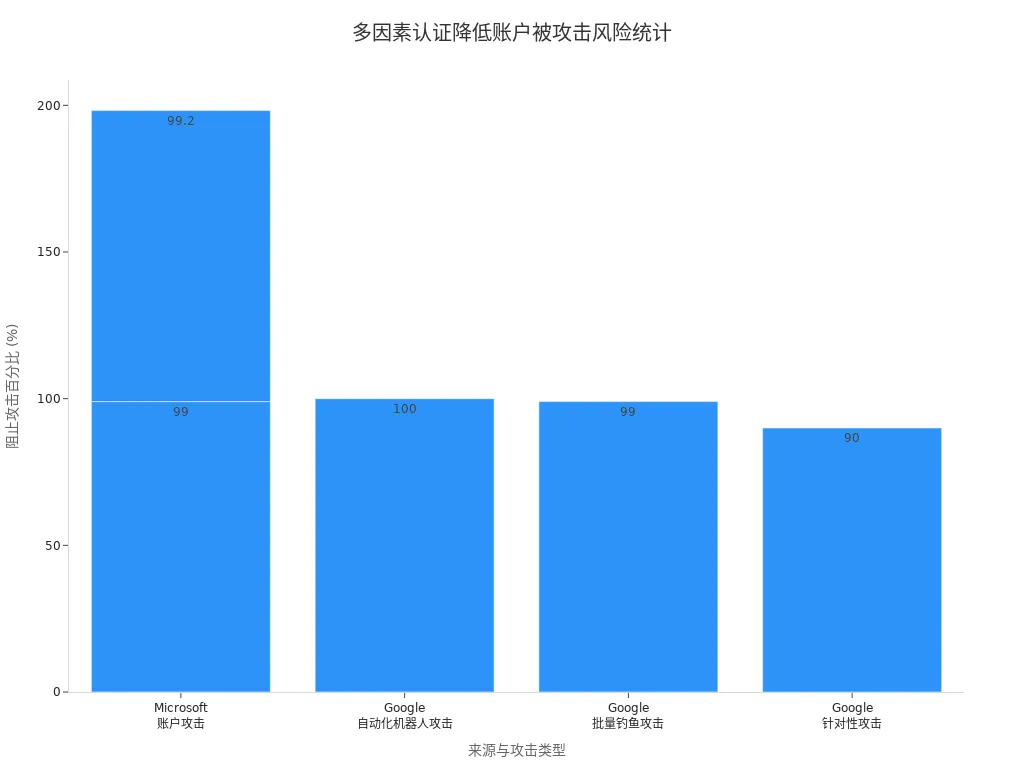
By enabling MFA, you can significantly reduce the risk of account theft. To secure MoneyGram, you must enable 2FA and periodically check the security and reliability of your authentication methods.
Phishing Prevention
Image Source: unsplash
Identifying Phishing Emails
When using MoneyGram, you may receive various emails, some of which could be phishing attempts. You need to learn to identify these suspicious emails to protect your account security. Common phishing tactics include:
- Suspicious email content, often disguised as official notifications.
- Emails requesting you to click links or download attachments.
- Emails creating a sense of urgency, urging immediate action.
- Senders using generic greetings like “Dear Customer”.
- Emails requesting personal information or account passwords.
- Sender email addresses that do not match official addresses.
- Emails containing spelling or grammatical errors.
When receiving such emails, you should stay vigilant. If you notice anything unusual, report it to MoneyGram’s official channels immediately for investigation. Understanding these common phishing tactics helps you better protect your personal information.
Tip: You can hover over links in emails to check the actual destination URL, avoiding clicks on suspicious links.
Preventing Malware
When conducting MoneyGram transfers, device security is equally important. Malware can infiltrate your device through email attachments, suspicious websites, or pirated software, stealing account information. You can take the following measures to prevent malware infections:
- Conduct regular security training for your devices to understand cybersecurity and risk management.
- Set strong passwords, avoiding reuse or using stolen passwords.
- Regularly scan devices and network infrastructure, promptly addressing security vulnerabilities.
- Develop an emergency plan to respond quickly to cyber attacks.
When handling financial transactions with licensed banks in mainland China or Hong Kong, these security measures are equally critical. By adopting good security habits, you can significantly reduce the risks posed by malware.
Account Monitoring
Checking Account Activity
To secure your MoneyGram account, you must develop a habit of regularly checking account activity. You can log into the MoneyGram website or app to review recent transfer records and login history. Pay attention to the time, amount, and recipient information for each transaction. If you notice unrecognized transactions or login records, someone may have accessed your account without authorization. You can follow these methods for self-checks:
- Review account history weekly, verifying all transfer details.
- Check login devices and IP addresses to confirm they belong to you.
- Monitor account balance changes, documenting anomalies promptly.
Users of licensed banks in Hong Kong or U.S. financial service platforms also regularly check account activity to prevent fund theft. Staying vigilant allows you to detect risks promptly.
Handling Anomalies
If you detect unusual account activity, you should act immediately. Do not process suspicious transactions or respond to unfamiliar emails. You can follow these steps:
- Report suspicious or unusual activity immediately.
- Report via phone (U.S.: 1-800-866-8800) or MoneyGram’s online form.
- Retain evidence, such as screenshots and transaction records, for subsequent investigations.
- Change your account password to enhance security.
Tip: Avoid continuing account operations until safety is confirmed. When facing issues, prioritize contacting official customer support to protect your funds.
Device and Network Security
Secure Device Usage
When logging into your MoneyGram account, you should prioritize using personal dedicated devices. Avoid entering account information on computers in internet cafes, libraries, or other public places. Dedicated devices reduce the risk of malware installation or data theft by others. You can set screen locks and fingerprint recognition on your phone or computer to prevent unauthorized access.
Tip: Regularly check your device’s security settings and disable unnecessary Bluetooth or sharing functions to effectively reduce the likelihood of account theft.
Public Network Risks
When using public Wi-Fi at airports, coffee shops, or similar locations in mainland China or Hong Kong, your account security faces multiple threats.
- Using public Wi-Fi for electronic fund transfers makes data susceptible to interception or malware infection.
- Man-in-the-middle attacks (MITM) allow hackers to steal login credentials or personal information.
- Many public networks lack encryption, making it easy for cybercriminals to access your transmitted data.
- Some hackers set up fake Wi-Fi networks resembling legitimate ones to trick you into connecting and stealing sensitive information.
When conducting MoneyGram transfers, it’s best to use personal data plans or trusted encrypted networks. If you must use public Wi-Fi, enable a VPN to enhance data transmission security.
Software Updates
To secure your account, you must keep your operating system and applications updated. Regular software updates patch vulnerabilities in systems and apps, reducing the risk of cyberattacks by cybercriminals.
- Software updates help financial institutions better protect your sensitive data.
- Timely patching of vulnerabilities maintains the integrity of financial transactions, preventing hackers from exploiting known weaknesses.
You can enable automatic updates to ensure new patches are installed promptly. This ensures your MoneyGram account and other financial service accounts receive enhanced security protection.
Privacy and Identity Protection
Understanding Privacy Policies
When using MoneyGram, you should understand the platform’s privacy policies. MoneyGram places great importance on user data security, implementing multiple measures to protect your personal information.
- MoneyGram incorporates data protection into product design, ensuring compliance throughout the lifecycle.
- The platform uses industry-standard encryption to secure data transmitted through the app.
- All identity verification processes involve human oversight, not relying on automated decisions.
- You have the right to request data deletion, known as the “right to be forgotten.”
- MoneyGram regularly updates its privacy policies to comply with the latest data privacy regulations.
- Strict identity verification protocols help prevent account theft.
When handling financial transactions with licensed banks in mainland China or Hong Kong, you’ll encounter similar data protection measures. Understanding these policies helps you better manage your privacy rights.
Fraud Prevention Through Identity Verification
When transferring funds via MoneyGram, the platform requires identity verification. MoneyGram collaborates with professional technology companies, using Mobile Verify technology to enhance security. The table below outlines related identity verification measures and their effectiveness:
| Evidence Type | Description |
|---|---|
| Partners | MoneyGram collaborates with Mitek, using Mobile Verify for identity verification. |
| Effectiveness | After deploying Mobile Verify, payment fraud losses dropped by 20%, and account takeover fraud decreased by 80%. |
| Technical Features | Mobile Verify supports verification of various ID types, accurately detecting fraudulent identity documents. |
Effective identity verification is key to preventing fraud and account takeovers. Industry experts note that multi-layer verification using ID documents or biometrics is more secure than relying solely on passwords. You’ll encounter similar verification processes when handling transactions with U.S. financial service platforms or licensed banks in Hong Kong. These measures provide a robust shield for your funds and personal information.
Emergency Response
Handling Account Theft
If you suspect your MoneyGram account has been compromised, you must act immediately. You can follow these steps to protect your funds and information:
- List all potentially exposed data, including personal and account information.
- Promptly update your PIN and bank login credentials to prevent further access.
- Proactively freeze your credit to reduce financial risks.
- Be cautious of new email or SMS requests to avoid further information leaks.
- Stay vigilant about requests related to medical information to prevent identity misuse.
MoneyGram offers two years of free identity protection and credit monitoring services for affected U.S. consumers. You can regularly check bank and credit reports to promptly detect suspicious activity. When handling financial transactions with licensed banks in mainland China or Hong Kong, stay alert to account security and address anomalies immediately.
Tip: Save all relevant evidence, such as transaction screenshots and notifications, to facilitate subsequent investigations.
Official Contact Channels
If you encounter security issues with your MoneyGram account, you can seek help through the following official channels:
| Channel | Description |
|---|---|
| Send emails to security@moneygram.com to report security issues. | |
| Official Website Customer Support | Report issues via the customer support section of the MoneyGram website. |
| MoneyGram App | Report security issues directly through the MoneyGram app. |
After selecting the appropriate channel, provide detailed descriptions of the issue and relevant information to help customer support process your request quickly. Timely contact with official channels is a critical step in securing your account.
To secure MoneyGram, you must adopt good security habits.
- Verify the identity of senders and recipients to prevent fraud.
- Keep transaction details private and do not share them with others.
- Use encryption technology to protect digital transactions against cyber threats.
MoneyGram actively educates customers and provides robust security measures, allowing you to confidently conduct global remittances. By regularly checking and updating security settings and contacting official channels promptly when issues arise, you can effectively protect your account.
FAQ
What should I do if my MoneyGram account is stolen?
You should immediately change your password, contact MoneyGram’s official customer support, freeze your account, and save relevant evidence to prevent financial losses.
Can I log into MoneyGram on public Wi-Fi?
You are not advised to log in on public Wi-Fi, as public networks are vulnerable to hacking. Use personal data plans or a VPN instead.
How can I tell if a MoneyGram email is a phishing attempt?
You should verify the sender’s email address, check for spelling errors in the content, and avoid clicking suspicious links or attachments.
Securing your MoneyGram account with strong passwords, two-factor authentication, and device protection is critical, but high fees and persistent phishing risks—costing over $1 billion in global financial account losses in 2024—can still undermine your remittance experience. For a safer, more cost-effective alternative, turn to BiyaPay. With transfer fees as low as 0.5% and robust encryption paired with multi-layer authentication, BiyaPay ensures your funds and data stay secure. Use the real-time exchange rate tool to optimize your USD transfers with precision.
BiyaPay supports seamless fiat-to-crypto conversions across numerous countries, offering quick registration and same-day delivery. Best of all, you can trade stocks in US and Hong Kong markets without an overseas account, with zero fees on contract orders. Sign up for BiyaPay today to unlock secure, affordable global remittances and investments, streamlining your financial operations with confidence.
*This article is provided for general information purposes and does not constitute legal, tax or other professional advice from BiyaPay or its subsidiaries and its affiliates, and it is not intended as a substitute for obtaining advice from a financial advisor or any other professional.
We make no representations, warranties or warranties, express or implied, as to the accuracy, completeness or timeliness of the contents of this publication.
Related Blogs of

US-China Trade War Enters New Phase: How the Tech Industry Can Respond to Supply Chain Impacts

Essential Apps for Getting Started with US Stock Futures: These Apps Will Turn You into a Pro

Micro Dow, Micro Nasdaq, Micro S&P Futures Comprehensive Comparison – Helping You Find the Best Trading Choice


Focusing on AI and Semiconductors: In-Depth Analysis of 10 Leading Future US Tech Stocks

Choose Country or Region to Read Local Blog
 Australia
 Austria
 Belgium
 Canada
 Cyprus
 Czech Republic
 Denmark
 Estonia
 Finland
 France
 Germany
 Greece
 Hong Kong
 India
India Indonesia
 Ireland
 Italy
Italy Japan
Japan Latvia
 Lithuania
 Luxembourg
 Malaysia
 Malta
Malta Morocco
 Nepal
Nepal Netherlands
 New Zealand
 Norway
 Pakistan
 Philippines
 Poland
 Portugal
 Romania
 Singapore
 Slovakia
 Slovenia
 South Africa
 South Korea
 Spain
Spain Sweden
 Thailand
 The United States
 Turkey
 United Arab Emirates
 United Kingdom
 Vietnam
Contact Us




BIYA GLOBAL LLC is a licensed entity registered with the U.S. Securities and Exchange Commission (SEC No.: 802-127417); a certified member of the Financial Industry Regulatory Authority (FINRA) (Central Registration Depository CRD No.: 325027); regulated by the Financial Industry Regulatory Authority (FINRA) and the U.S. Securities and Exchange Commission (SEC).
BIYA GLOBAL LLC is registered with the Financial Crimes Enforcement Network (FinCEN), an agency under the U.S. Department of the Treasury, as a Money Services Business (MSB), with registration number 31000218637349, and regulated by the Financial Crimes Enforcement Network (FinCEN).
BIYA GLOBAL LIMITED is a registered Financial Service Provider (FSP) in New Zealand, with registration number FSP1007221, and is also a registered member of the Financial Services Complaints Limited (FSCL), an independent dispute resolution scheme in New Zealand.