What are the Remittance Apps that Accept American Express? Analysis of Fees, Limits, and Security




Image Source: unsplash
The United States is one of the world’s leading sources of remittances, with a total remittance volume of $79.15 billion in 2022. If you want to use an American Express card for remittances, finding the right remittance apps that accept American Express is crucial. Currently, mainstream options supporting this feature include Xoom, Wise, WorldRemit, and Remitly.
Important Reminder: Be aware that using a credit card for remittances may be treated as a “cash advance” by your card issuer. This means you may face high interest rates and typically no grace period.
Key Takeaways
- Xoom, WorldRemit, and Remitly directly accept American Express card remittances, while Wise requires indirect use through PayPal.
- Using an American Express card for remittances may be classified as a “cash advance” by the card issuer, incurring high interest and additional fees.
- Wise, with its transparent mid-market exchange rates and low service fees, is typically more cost-effective for large remittances.
- Before transferring, simulate the transaction in the app to confirm fees and exchange rates, and contact your card issuer to understand their cash advance policies.
- To avoid high fees, prioritize using a debit card or bank account for remittances.
Mainstream Remittance Apps Accepting American Express
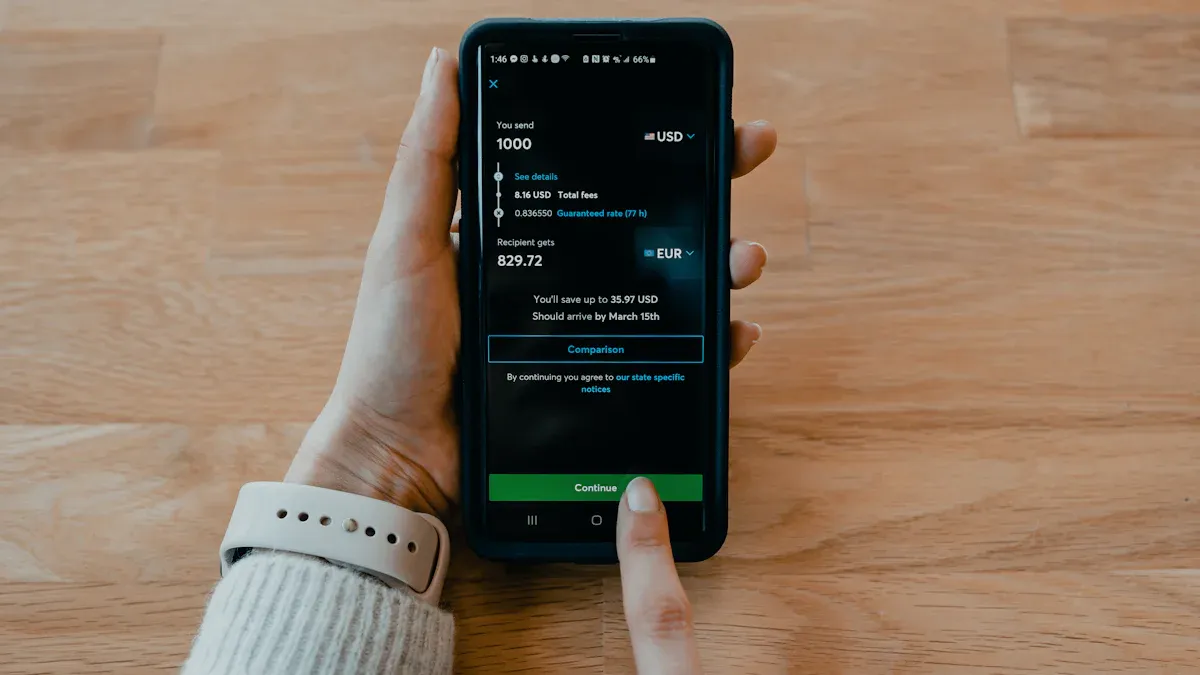
Image Source: unsplash
When you decide to use an American Express card for international remittances, understanding each platform’s specific policies is critical. Below, we dive into four mainstream platforms—Xoom, Wise, WorldRemit, and Remitly—to help you make an informed choice.
Xoom (A PayPal Service)
Xoom is an international remittance service under PayPal. One of its major advantages is that it directly accepts American Express card payments, offering great convenience for sending money to family and friends overseas.
- Amex Acceptance Policy: Xoom generally accepts American Express cards. You can select your Amex card directly on the payment page to complete the transaction. However, the platform does not specify any unique restrictions or fee policies for Amex cards.
- Fee Structure: Xoom’s fees consist of two main components:
- Transaction Fees: These vary based on the remittance amount, destination, and payment method.
- Exchange Rate Markup: Xoom adds a margin to the wholesale exchange rate for profit. You can see the final amount received before confirming the transaction.
- Main Limits: Remittance limits vary based on your account verification level, recipient country, and receiving method. Typically, new users face lower limits, but you can increase them by providing additional identity information.
- Security Measures: As part of PayPal, Xoom benefits from its robust security system. The platform uses advanced encryption to protect your personal and financial information and has a 24/7 fraud monitoring system to ensure transaction safety.
Special Reminder: Although Xoom accepts Amex, your card issuer may classify the transaction as a “cash advance.” Before initiating a remittance, it’s best to contact your card issuer to confirm their policy.
Wise (Formerly TransferWise)
Wise is renowned for its transparent fees and true mid-market exchange rates. However, there’s one key point to note.
- Amex Acceptance Policy: Wise does not directly accept American Express (Amex) cards as a funding source for remittances. Wise explicitly states that it only accepts Visa, Mastercard, and select Maestro cards with a 16-digit card number, expiration date, and 3D Secure authentication.
- Fee Structure: Wise’s fee model is highly transparent. It uses the mid-market exchange rate (the rate you see on Google) and charges only a small, disclosed service fee, meaning you avoid hidden costs in the exchange rate.
- Main Limits: Wise offers very high remittance limits, which vary depending on the currency and payment method. Bank account transfers typically allow the highest limits.
- Security Measures: Wise invests heavily in security, implementing multiple measures to protect user funds and data:
- Fund Segregation: Your funds are held in dedicated accounts at top-tier banks, completely separate from the company’s operating funds.
- Advanced Authentication: Transactions require a password and two-step verification (via SMS, app notifications, etc.). Card payments also require 3D Secure authentication.
- Compliance Certifications: Wise is certified under multiple international security standards, including PCI DSS (Payment Card Industry Data Security Standard), SOC 1, SOC 2 audits, and ISO 27001, and fully complies with GDPR data protection regulations.
How to Use Amex Indirectly? Although Wise doesn’t directly support Amex, you can use a workaround: link your American Express card to a PayPal wallet and select PayPal as the payment method on Wise. This creates a funds flow of “Amex -> PayPal -> Wise.” Note that this process may incur PayPal fees.
WorldRemit
WorldRemit is another popular remittance app that accepts American Express, offering diverse receiving options such as cash pickup, bank transfers, and mobile wallet top-ups.
- Amex Acceptance Policy: WorldRemit accepts major credit and debit cards, including American Express, providing flexible payment options.
- Fee Structure: Fees and exchange rates vary dynamically based on the destination country, amount, and receiving method. Typically, credit card payments incur slightly higher fees than bank account transfers.
- Main Limits: WorldRemit sets clear limits for different payment methods. For U.S. users, the limits are as follows:
The platform may also impose additional time-based restrictions based on your account status and transaction history.Payment Method Per Transaction Limit (USD) 24-Hour Limit (USD) Bank Card (Debit/Credit/Prepaid) 5,000 9,000 Apple Pay 300 9,000 - Security Measures: WorldRemit is authorized by multiple global financial regulators. It uses industry-standard encryption and strict Know Your Customer (KYC) identity verification processes to prevent fraud and complies with PCI DSS standards to protect your card data.
Remitly
Remitly is favored for its clear service options and pricing tailored to different delivery speeds, making it another remittance app that accepts American Express.
- Amex Acceptance Policy: Remitly generally accepts American Express cards but has some restrictions. You should note:
- Not all types of Amex cards are accepted, such as certain prepaid cards.
- Acceptance may vary depending on your location and the destination country.
- It’s recommended to attempt linking your card before initiating a transfer to verify eligibility.
- Fee Structure: Remitly offers two main services:
Economy(lower cost, slower) andExpress(faster, higher cost). When using a credit card (including Amex), you may face additional fees regardless of the service chosen.
This 3% fee is charged by Remitly and does not include potential cash advance fees and interest from your card issuer.Service Type Credit Card Fee (U.S.) Economy 3% (based on total transfer amount) Express 3% (based on total transfer amount) - Main Limits: Remitly uses a tiered limit system. New users typically start at Tier 1 with lower limits. You can request an upgrade to Tier 2 or Tier 3 by submitting additional identity documents, allowing higher daily and monthly remittance amounts.
- Security Measures: Remitly places a strong emphasis on security and compliance. It is certified for PCI DSS for handling card data and complies with the EU’s GDPR data protection regulations, ensuring your personal information is well-protected globally.
Core Metrics Comparison
To help you compare these remittance apps more intuitively, we’ve organized and analyzed them across four key dimensions: fees, exchange rates, limits, and security.
Fees and Exchange Rates Comparison
Fees and exchange rates are critical factors determining the final amount received. Some services may advertise low fees but add high markups to the exchange rate, and vice versa.
- Wise: Known for its transparent fee structure. It uses the true mid-market exchange rate, the rate you see on Google, and charges a clear service fee. This model typically saves you more, especially for large remittances.
- Xoom: Often charges no fixed transfer fee but includes a profit margin in the exchange rate. This means the rate you see is slightly higher than the mid-market rate.
- Remitly: Offers Economy and Express service modes. Using a credit card (including Amex) typically incurs a 3% fee. Its exchange rate also includes a markup.
- WorldRemit: Has a fee structure similar to Remitly, varying by destination and payment method. Credit card payments generally have higher fees than bank account transfers.
For a clearer comparison, here’s an example of converting $1,000 USD to Philippine Pesos:
| Provider | Exchange Rate (1 USD) | Transfer Fee | Recipient Receives (Sending 1,000 USD) |
|---|---|---|---|
| Market Mid-Rate | 58.6700 PHP | N/A | 58,670.00 PHP |
| Xoom | 59.7554 PHP | 0.00 USD | 59,755.42 PHP |
| Wise | 58.6700 PHP | 12.66 USD | 57,927.24 PHP |
| WorldRemit | 56.7808 PHP | 0.00 USD | 56,780.84 PHP |
| Remitly | 56.9664 PHP | 0.00 USD | 56,966.41 PHP |
Note: The above data is an example; actual exchange rates and fees vary in real-time.
As shown in the table, while Xoom’s exchange rate appears the highest, it may include its profit margin. Wise uses the mid-market rate directly and lists fees separately, offering greater transparency.
Remittance Limits Comparison
Remittance limits are another important factor, especially for users needing to transfer large sums.
- Xoom: New users typically face lower limits, such as a maximum of $2,999 per transaction and $6,000 within 30 days. You can increase these limits by providing additional identity verification documents (e.g., SSN, passport, or bank statements).
- Wise: Offers very high remittance limits. For example, transfers from the U.S. can reach up to $1,000,000 per transaction, depending on the payment method.
- WorldRemit: For U.S. users, the per-transaction limit using a bank card (including credit cards) is $5,000, with a 24-hour total limit of $9,000.
- Remitly: Uses a tiered limit system. New users start with lower limits, but upgrading to Tier 2 or Tier 3 by providing more personal information can increase single transaction limits to up to $100,000.
| Remittance App | Amex Fee Model | Exchange Rate Competitiveness | Main Limits | Security Compliance (PCI DSS) |
|---|---|---|---|---|
| Xoom | Included in exchange rate markup | Medium | Lower initial limits, requires verification for upgrades | Yes |
| Wise | Indirect use via PayPal, incurs PayPal fees | High | Very high limits, up to $1,000,000 | Yes (Level 1) |
| WorldRemit | Independent fees | Medium | Max $5,000 per transaction, $9,000 in 24 hours | Yes |
| Remitly | Approx. 3% credit card fee | Medium | Tiered limits, up to $100,000 | Yes |
Security and Compliance Comparison
When handling financial transactions, security is paramount. All mainstream remittance apps accepting American Express employ advanced security measures to protect your funds and personal information.
- Encryption and Security Protocols: All mentioned platforms use SSL encryption to secure data transmission, ensuring your personal and financial information is not intercepted during transfers.
- Two-Factor Authentication (2FA): Services like Wise mandate two-factor authentication, adding an extra layer of security to your account.
- Compliance: These companies are subject to strict financial regulations in the countries where they operate. In the U.S., they are registered as Money Service Businesses (MSBs) with FinCEN and hold remittance licenses in multiple states.
- PCI DSS Compliance: The Payment Card Industry Data Security Standard (PCI DSS) is critical for protecting cardholder data. All platforms accepting credit cards, including Xoom, WorldRemit, and Remitly, must comply with this standard. Wise achieves the highest Level 1 certification, ensuring top-tier security.
Overall, these platforms invest significant resources to ensure transaction security, allowing you to use them with confidence.
Key Risks and Considerations
Image Source: unsplash
While using an American Express card for remittances is convenient, it comes with hidden risks and additional costs. Before clicking “send,” understanding these considerations is critical, as they can significantly increase your total remittance costs.
Cash Advance Risks
This is the biggest risk to watch out for when using a credit card for remittances. Many card issuers, including American Express, are likely to classify transfers made through remittance apps as “cash advances” rather than regular purchases.
Important Warning: Cash advance transactions typically incur high interest rates immediately, with no grace period. This means interest starts accruing from the moment you send the remittance.
This treatment results in two direct financial consequences:
- Cash Advance Fee: Your card issuer will charge an additional fee, typically 3% to 5% of the transaction amount.
- Higher Annual Percentage Rate (APR): Cash advances have much higher interest rates than regular purchases, and interest is calculated daily.
Even if the remittance app (e.g., PayPal or Xoom) accepts credit cards, the transaction’s nature is ultimately determined by your card issuer.
Additional Issuer Fees
Beyond the service fees charged by the remittance platform and potential exchange rate markups, your American Express card issuer may impose other fees. For example, some remittance apps may involve currency conversion, which could trigger additional foreign transaction fees.
You need to calculate all potential costs combined:
- Remittance platform service fees (e.g., Remitly’s approximate 3% credit card fee).
- Hidden markups in the platform’s exchange rate.
- Card issuer’s cash advance fee.
- Instant high interest charged by the card issuer.
These fees can add up, potentially making your actual costs far higher than expected.
Rewards Points Value Analysis
You might wonder whether using an American Express card for remittances can earn valuable Membership Rewards points. The answer is usually no. American Express’s terms clearly state that the following transaction types do not qualify for points accumulation:
- Cash advances (and transactions deemed as cash advances)
- Prepaid card top-ups
- Foreign exchange transactions
Since remittances are likely to be classified as cash advances, you not only miss out on points but also incur high fees. To illustrate the missed value, the value of American Express points varies by redemption option.
In summary, paying high cash advance fees and interest for minimal or zero points is not cost-effective. In most cases, using a debit card or bank account for remittances is a more economical and wiser choice.
Choosing the right remittance app for American Express depends on your specific needs. Xoom, WorldRemit, and Remitly offer direct payment convenience, while Wise is more cost-effective. You can decide based on the following:
- Cost-Sensitive: Prioritize Wise (via PayPal indirectly).
- Speed Priority: Choose Remitly’s Express service or Xoom.
- Large Transfers: Wise typically offers higher remittance limits.
Final Action Advice: Before sending, simulate a transfer in your chosen app to get the most accurate fees and exchange rates. Also, contact your card issuer to confirm whether the transaction will be treated as a “cash advance” to avoid unexpected high fees.
After comparison and issuer confirmation, consider standardizing a “verify → estimate → submit” flow to cut errors and hidden costs. First, validate beneficiary bank details with BiyaPay’s SWIFT Lookup and IBAN Lookup. Next, use the free FX Rate & Converter to estimate the recipient’s net amount and your all-in cost. If you prefer to keep payment execution and receipts in one place, you can initiate the transfer via BiyaPay Remittance and download the confirmation for your records.
BiyaPay positions itself as a multi-asset trading wallet covering cross-border payments and funds management, operating under relevant registrations in multiple jurisdictions (e.g., US MSB, NZ FSP). Used as a practical “tooling layer” alongside your existing apps, it helps keep bank and currency details consistent and reduces return payments or additional document requests caused by incomplete information.
FAQ
Which remittance app accepting American Express is the cheapest?
There’s no universally cheapest option. Wise is often more cost-effective for large remittances due to its transparent mid-market exchange rates and low service fees. Simulate transactions on different apps to compare total costs before sending.
Why was my American Express card declined on Remitly?
Remitly may not accept all types of American Express cards, such as certain prepaid cards. Additionally, your location or the destination country may affect card acceptance. Try a different card or contact customer support.
Can I use an American Express card to send money to mainland China?
Yes. Platforms like Xoom, WorldRemit, and Remitly generally support remittances to mainland China. However, confirm that the app supports the recipient’s bank or payment tool (e.g., Alipay) before use.
How can I completely avoid cash advance fees?
The most reliable way to avoid cash advance fees is to avoid using a credit card for remittances.
Best Practice: Prioritize using a debit card or direct bank account transfer. These methods typically have lower fees and no cash advance risks.
*This article is provided for general information purposes and does not constitute legal, tax or other professional advice from BiyaPay or its subsidiaries and its affiliates, and it is not intended as a substitute for obtaining advice from a financial advisor or any other professional.
We make no representations, warranties or warranties, express or implied, as to the accuracy, completeness or timeliness of the contents of this publication.
Related Blogs of

Say Goodbye to Panic: Master the Winning Rules for Stock Investing in a Bear Market


Want to Invest in the Chinese Stock Market? Start by Understanding the Shanghai Composite Index


What Does Price-to-Earnings Ratio (PE) Mean? Master It to Navigate the Chinese Stock Market

Say Goodbye to Bank Queues: Latest 2025 Bank of China App Guide for Converting Cash to Exchange

Choose Country or Region to Read Local Blog
 Australia
 Austria
 Belgium
 Canada
 Cyprus
 Czech Republic
 Denmark
 Estonia
 Finland
 France
 Germany
 Greece
 Hong Kong
 India
India Indonesia
 Ireland
 Italy
Italy Japan
Japan Latvia
 Lithuania
 Luxembourg
 Malaysia
 Malta
Malta Morocco
 Nepal
Nepal Netherlands
 New Zealand
 Norway
 Pakistan
 Philippines
 Poland
 Portugal
 Romania
 Singapore
 Slovakia
 Slovenia
 South Africa
 South Korea
 Spain
Spain Sweden
 Thailand
 The United States
 Turkey
 United Arab Emirates
 United Kingdom
 Vietnam
Contact Us




BIYA GLOBAL LLC is a licensed entity registered with the U.S. Securities and Exchange Commission (SEC No.: 802-127417); a certified member of the Financial Industry Regulatory Authority (FINRA) (Central Registration Depository CRD No.: 325027); regulated by the Financial Industry Regulatory Authority (FINRA) and the U.S. Securities and Exchange Commission (SEC).
BIYA GLOBAL LLC is registered with the Financial Crimes Enforcement Network (FinCEN), an agency under the U.S. Department of the Treasury, as a Money Services Business (MSB), with registration number 31000218637349, and regulated by the Financial Crimes Enforcement Network (FinCEN).
BIYA GLOBAL LIMITED is a registered Financial Service Provider (FSP) in New Zealand, with registration number FSP1007221, and is also a registered member of the Financial Services Complaints Limited (FSCL), an independent dispute resolution scheme in New Zealand.